

Sync your tech stack from CI
AlertaVuln raises CVE alerts against the packages a project tracks (its tech stack). Instead of curating that list by hand, have your pipeline report the dependencies it just resolved, so every build keeps the tracked set current and new packages start being matched against incoming CVEs automatically.
From your repo root that is a single command:
av techstack sync --project "$ALERTAVULN_PROJECT_ID"With nothing but a project ID, sync detects the repository and ref from git,
discovers the dependency manifests and lockfiles in the working tree, and
uploads them to be parsed. This guide wires that command into GitHub Actions
and Azure DevOps, signing in with an organisation API key your platform
injects from a secret variable.
How authentication works in CI
Section titled “How authentication works in CI”There is no interactive browser login in a pipeline. Instead the CLI reads an
organisation API key from the ALERTAVULN_API_KEY environment variable and
uses it as the request token for that one invocation. Your CI platform holds
the key as a secret and injects it into the job; the CLI never writes it to
disk, so it stays ephemeral on the runner.
Before you start
Section titled “Before you start”-
Create an organisation API key with ReadWrite scope. In the web app, open Settings and the API Keys panel (org-admin only). A syncing pipeline writes to the project, so the key must be ReadWrite, not ReadOnly. The key looks like
av_live_followed by 64 hex characters and is shown once, so copy it immediately. -
Store the key as a secret in your CI platform (next section). Never commit it or print it in logs.
-
Find the project ID you want to sync into. Install the CLI locally and run
av project list, then copy the ID from the first column (it is also on the project’s page in the web app).
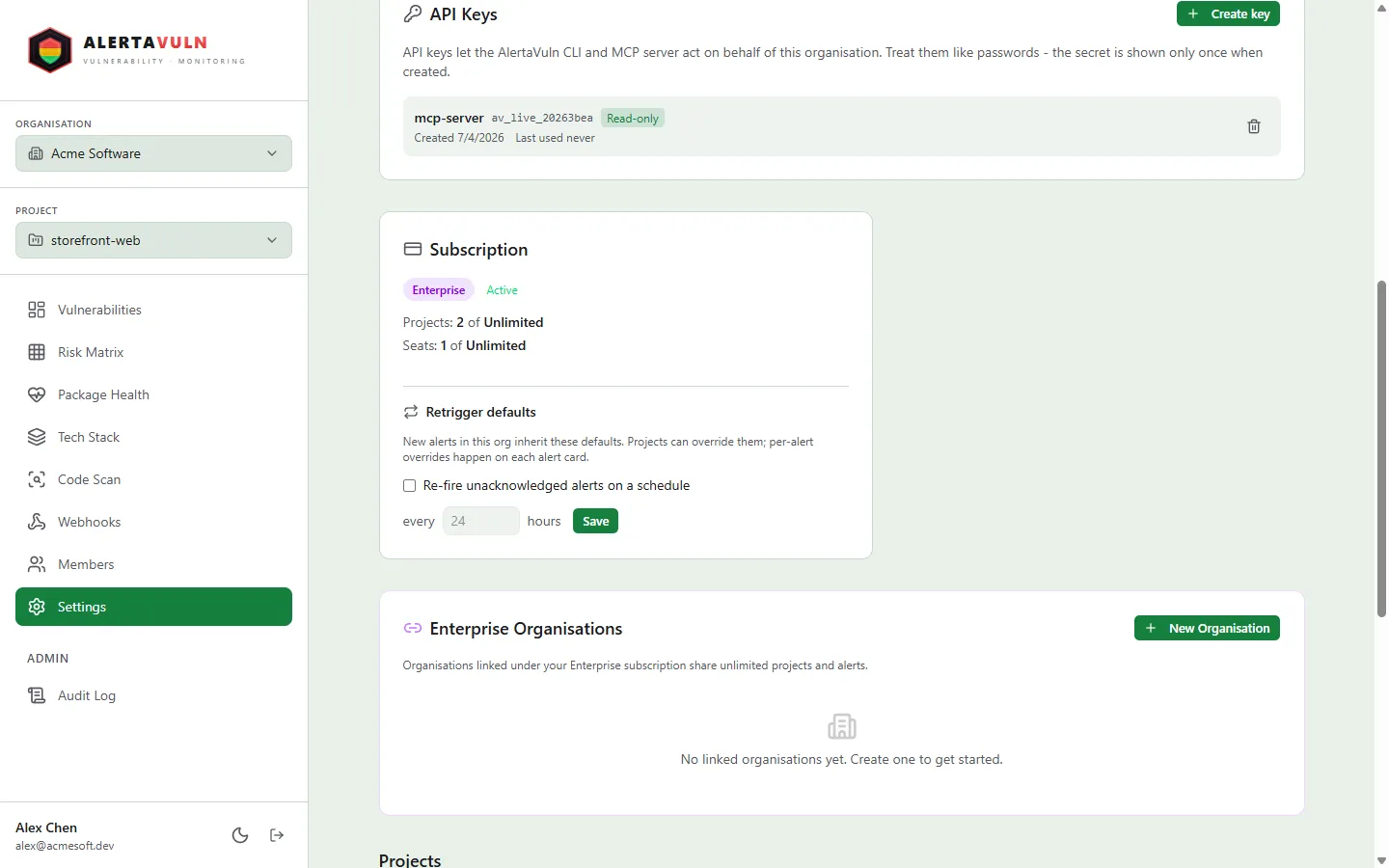
Create a ReadWrite key under Settings, in the API Keys panel. Demo data.
$ av project listID NAME MIN SEVERITY CREATEDf76e8644-5d72-4641-ab94-b38068c72aea checkout-service Medium 2026-07-05c7cd82a7-da7a-4049-9083-376d73d06ac4 payments-api Medium 2026-07-045f8ccb20-bd0c-40a4-872b-3d227cb0e03e storefront-web Medium 2026-07-04Store the API key as a secret
Section titled “Store the API key as a secret”Add a repository (or organisation) secret named ALERTAVULN_API_KEY
under Settings -> Secrets and variables -> Actions. Store the project ID
as a plain variable (it is not sensitive) named ALERTAVULN_PROJECT_ID.
Add a secret pipeline variable named ALERTAVULN_API_KEY (a variable
group backed by Azure Key Vault works well for sharing it across pipelines).
Store the project ID as an ordinary variable named ALERTAVULN_PROJECT_ID.
Add the pipeline
Section titled “Add the pipeline”The job does three things: check out the repository, install the CLI, and run
the sync from the checkout. Because sync reads the manifests on disk, it must
run after checkout, from the repository root.
name: Sync tech stackon:  push:    branches: [main]
jobs:  techstack:    runs-on: ubuntu-latest    env:      # Injected from the repository/organisation secret; read by the CLI.      ALERTAVULN_API_KEY: ${{ secrets.ALERTAVULN_API_KEY }}    steps:      - uses: actions/checkout@v4
      - name: Install the AlertaVuln CLI        run: |          curl -fsSL https://get.alertavuln.com/cli/install.sh | sh          echo "$HOME/.local/bin" >> "$GITHUB_PATH"
- name: Sync tech stack run: av techstack sync --project "${{ vars.ALERTAVULN_PROJECT_ID }}"trigger: branches: include: [main]
pool: vmImage: ubuntu-latest
steps: - checkout: self
- script: | curl -fsSL https://get.alertavuln.com/cli/install.sh | sh echo "##vso[task.prependpath]$HOME/.local/bin" displayName: Install the AlertaVuln CLI
- script: av techstack sync --project "$(ALERTAVULN_PROJECT_ID)" displayName: Sync tech stack env: # Secret variables are NOT auto-exposed to the environment - map it here. ALERTAVULN_API_KEY: $(ALERTAVULN_API_KEY)On the next push to main the job installs the CLI, authenticates with the
injected key, and reconciles the project’s tech stack to exactly the
dependencies in the repository. Each run prints the manifests it found and how
many packages the project now tracks:
$ av techstack sync --project "$ALERTAVULN_PROJECT_ID"Repository: https://github.com/acmesoft/checkout-service.gitRef: mainMANIFEST ECOSYSTEM PACKAGES NOTEgo.mod Go 2package-lock.json Npm 4package.json - 0 superseded by lockfileservices/pricing/requirements.txt Pip 2Synced. Project now tracks 8 package(s).A few things worth noting from that output:
- It found manifests across several ecosystems (npm, Go, pip) and in subdirectories, not just the repo root.
- Where a lockfile pins what a manifest only declares as a range, the lockfile
wins:
package-lock.jsonsupersedespackage.json, so the versions tracked are the resolved ones. - Vendored and build directories (
node_modules,vendor,dist,target, and the like) are skipped, so you report what the project declares, not what happens to be checked in.
How does this work?
Section titled “How does this work?”The sync is deliberately split so that only your dependency versions leave the pipeline - never your source.
-
The CLI discovers files locally. It walks the working tree and picks out the dependency manifests and lockfiles it recognises (
package.json,package-lock.json,go.mod,requirements.txt,*.csproj,pom.xml, and so on), skipping vendored and build directories. Nothing else is read. -
It uploads just those files’ contents, together with the repository URL and ref it detected from git. Your code, history, and any non-manifest files stay on the runner.
-
The server parses and discards. Each uploaded file is parsed with the same parsers the built-in repository scanner uses, lockfile precedence is applied, and the resolved
(name, version, ecosystem)for every dependency is extracted. The uploaded content is then thrown away - it is never written to a database or to disk. -
Only the versions are kept. What persists is the resolved package coordinates plus the provenance you would expect on a dependency list: the repository URL and which manifest each package came from. That is the whole footprint - we do not keep your files, your paths, or your source.
The same limits as the repository scanner apply as a safety net: files over 2 MB, more than 250 manifests, or more than 50 MB in total are ignored rather than uploaded, and anything that is not a recognised manifest is never sent.
Verify it worked
Section titled “Verify it worked”List the project’s tracked packages after a run, from the pipeline or your machine:
$ av techstack list --project "$ALERTAVULN_PROJECT_ID"ID PACKAGE ECOSYSTEM VERSION HEALTH2442b114-ab09-4d77-acc0-e68ad1046138 body-parser Npm 1.20.3 Healthy5eac09cf-d38f-4d6d-aabc-b3d7c5a039ed express Npm 4.21.2 Healthy9a3a93c4-56ea-4792-8c8a-1e4dab21e8ce fastapi Pip ==0.115.6 Healthybde347b7-40f2-4748-a497-4e19ccdac011 github.com/gin-gonic/gin Go v1.10.0 Stalea4263890-6100-4598-b3ed-0110d6f6c277 github.com/redis/go-redis/v9 Go v9.7.0 Healthy2ded0c51-b908-47c7-9f14-7f4aae8922f7 pg Npm 8.13.1 Healthydc1d811a-a391-4b3e-b599-b02bef95a4e8 requests Pip ==2.32.3 Healthy78eb00ac-3e64-4546-a1ba-6cc6d6d441dd stripe Npm 17.5.0 HealthyA CLI-synced repository shows up in the web app just like one scanned from our side. On the project’s tech stack, under Connected Git Repositories, it appears as a repository card - with a Run by CLI pill in place of the Rescan button, since your pipeline (not our scanner) keeps it current. If the same repository is also connected for server-side scanning, the card shows both.
The HEALTH column is filled in the background after the first sync (package
maintenance status is fetched asynchronously), so a brand-new package reads
Unknown moments after the push and settles to its maintenance status - such as
Healthy, Stale or deprecated - once the first health pass completes.
From here on, any CVE that matches a tracked package raises a RED / YELLOW / GREEN alert on the project, delivered through whatever notification channels you have configured.
Advanced: report an explicit package list
Section titled “Advanced: report an explicit package list”If you cannot run the CLI inside a checkout - for example you resolve
dependencies in a separate job and only carry a list forward - sync also
accepts a pre-resolved list in manual mode. Pass --repo, --manifest,
--ecosystem, and one repeated --package name@version per dependency:
av techstack sync --project "$ALERTAVULN_PROJECT_ID" \ --repo "https://github.com/acmesoft/checkout-service" \ --manifest package.json \ --ecosystem npm \Manual mode covers one --ecosystem per invocation and does not read any files;
you own producing the list. Generate the flags from your resolved lockfile - for
npm:
# Every resolved dependency as name@version, de-duplicated.mapfile -t PKGS < <(  jq -r '.packages | to_entries[]    | select(.key | startswith("node_modules/"))    | (.key | sub(".*node_modules/"; "")) + "@" + (.value.version // empty)' \    package-lock.json | sort -u)
args=()for p in "${PKGS[@]}"; do args+=(--package "$p"); done
av techstack sync --project "$ALERTAVULN_PROJECT_ID" \  --repo "$REPO_URL" --manifest package-lock.json --ecosystem npm "${args[@]}"
For most pipelines the flag-free autonomous command above is simpler and covers
every ecosystem in one pass, so reach for manual mode only when you genuinely
cannot run sync inside the checkout.
Keep the key safe
Section titled “Keep the key safe”- Use a dedicated ReadWrite key for CI, separate from any personal login, so you can rotate or revoke it without disrupting anyone else.
- Keep it in your platform’s secret store. Do not echo it, and prefer a Key Vault-backed variable group on Azure DevOps.
- If a key is exposed, revoke it in Settings -> API Keys and issue a new one.
See also
Section titled “See also”av techstackreference - every subcommand and flag.- Authentication - interactive login for local use.
- CI/CD - gate a build on
av sast scanfindings.