

Red, yellow, green
Everything AlertaVuln raises carries one of three verdicts - REDYELLOWGREEN - and every verdict carries the reasoning that produced it.
Verdicts, not severity labels
Section titled “Verdicts, not severity labels”A CVE’s severity (Critical / High / Medium / Low) rates the vulnerability in the abstract. The tier answers a different question: does this affect you? A Critical CVE in a package whose affected range your pinned version falls outside is not a RED for you - and a Medium one in the exact version you ship is.
The web app renders the same tiers on alerts as EXPOSED, CHECK MANUALLY, and SAFE badges; the CLI prints the tier names. The tiers are ordered - RED outranks YELLOW outranks GREEN - and summaries report the worst tier present, so a scan with no findings is GREEN.
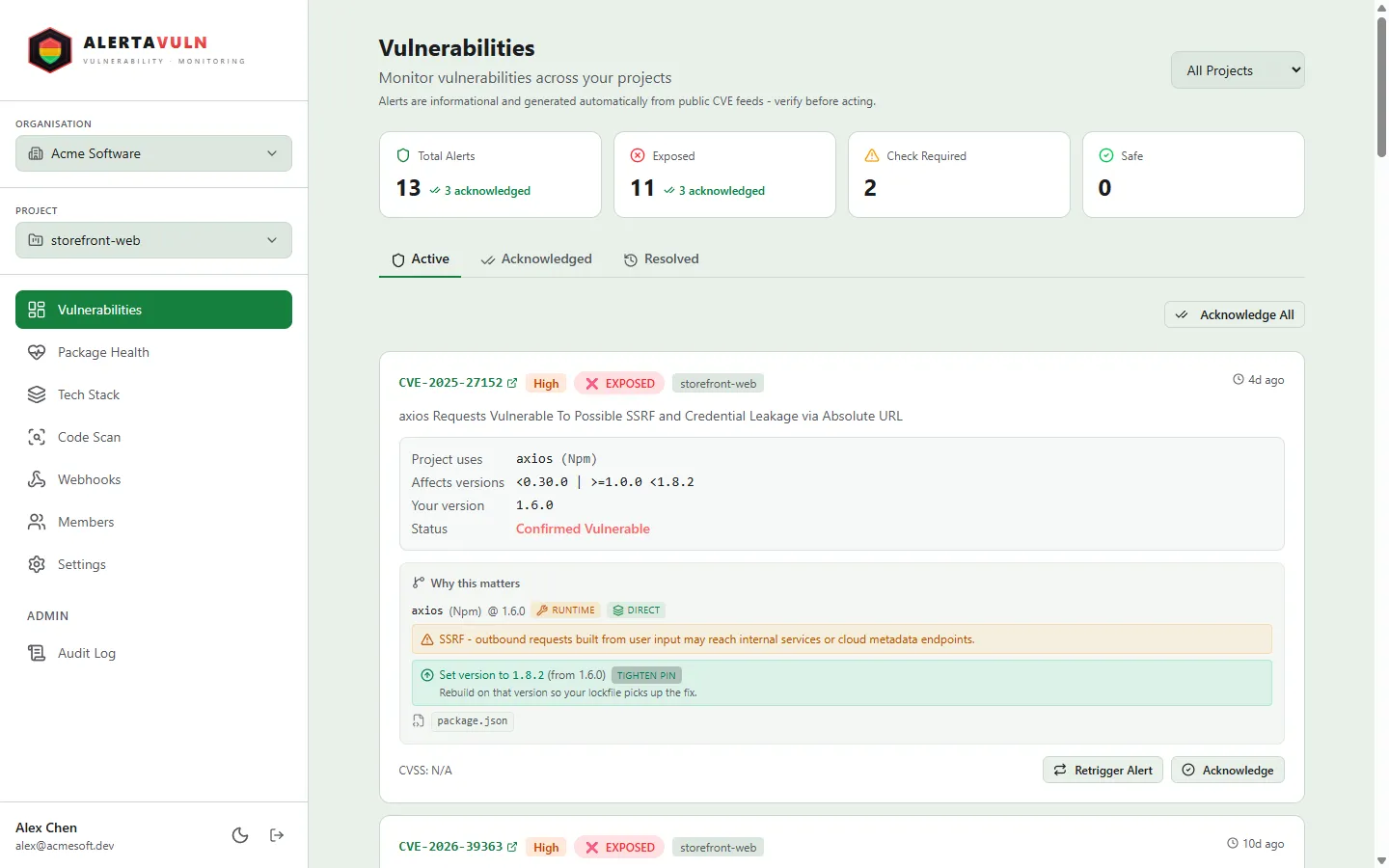
The dashboard tiles count each tier at a glance; every alert wears its EXPOSED / CHECK MANUALLY / SAFE badge. Demo data.
Reasoning is always attached
Section titled “Reasoning is always attached”A verdict without a why is just another severity label. Every alert records
the evidence behind its tier: which of your packages matched, the affected
version range, the fixed version, your recorded version, and the conclusion -
CONFIRMED VULNERABLE, or an explicit instruction to verify manually when
your version could not be evaluated. Two threat signals are appended when
they apply: a warning when the CVE is on the CISA KEV list of actively
exploited vulnerabilities, and the EPSS probability when it exceeds 50%.
The reasoning for a RED alert has this shape:
Project “storefront” uses lodash (Npm). Affected versions:
<4.17.21. Fixed in:4.17.21. Your version:4.17.19. CONFIRMED VULNERABLE. WARNING: This vulnerability is known to be actively exploited in the wild (CISA KEV).
How each surface decides the tier
Section titled “How each surface decides the tier”CVE alerts
Section titled “CVE alerts”When a new CVE lands, it is matched against the tech stack recorded on each of your projects:
| Verdict | When |
|---|---|
| RED | Your recorded version is confirmed inside the CVE’s affected range. |
| YELLOW | The package matches but exposure can’t be confirmed - you recorded no version, or the affected range couldn’t be evaluated against your version constraint. |
| GREEN | Your version is confirmed outside the affected range - no alert fires at all. |
A confirmed-clear match never pages you: packages proven unaffected are filtered out before an alert is created, so the alerts that do reach you are only ever confirmed exposure (RED) or a judgement call you need to make (YELLOW). GREEN is the all-clear bucket in alert summaries and across the other surfaces below.
Alerts also resolve themselves: when your tech stack changes so the CVE no longer matches a vulnerable version - you updated or removed the package - the alert is marked resolved under exactly the same conditions that would have prevented it from firing.
SAST findings
Section titled “SAST findings”Code-scan findings arrive from the engines as SARIF, and the same mapping is applied by the CLI locally and by the server for uploaded and server-side scans:
| Signal | RED | YELLOW | GREEN |
|---|---|---|---|
security-severity score (0–10) |
≥ 7.0 | ≥ 4.0 | < 4.0 |
| SARIF level (when no score) | error |
warning |
anything else |
A numeric score takes precedence over the textual level, so an engine that labels a 9.1-scored finding a mere “warning” still gets a RED. The web app shows these tiers with HIGH / MEDIUM / LOW labels in the same three colours.
For CI, av sast scan --fail-on red (or --fail-on yellow) exits non-zero
when the worst finding is at or above that tier - see
av sast scan.
Package checks
Section titled “Package checks”av check pre-flights a package coordinate you’re considering adding
(see the Quickstart for a first run). Each matching CVE carries a
classification: red when the version you asked about is confirmed inside
the affected range, yellow when it couldn’t be determined. CVEs whose
ranges confirm the version is not affected are omitted from the result
entirely - a check that comes back with zero matching CVEs is the GREEN
outcome.
The CVE’s own severity, CVSS, EPSS, and KEV flag are reported alongside, so you can weigh the abstract rating and the personal verdict together.
The same scale everywhere
Section titled “The same scale everywhere”Other checks reuse the identical tiers rather than inventing new ones - for example, licence policy classifies strong-copyleft licences RED, weak-copyleft / proprietary / unknown licences YELLOW, and permissive licences GREEN. Wherever you see the three colours in AlertaVuln, they mean the same thing: act, decide, or clear.
See also
Section titled “See also”- Introduction - what AlertaVuln is and how the pieces fit.
- Quickstart - get your first verdict in five minutes.
av sast scan- tier local code findings and gate CI on the worst one.