

MCP server
The AlertaVuln MCP server lets any Model Context Protocol client - Claude Code, Claude Desktop, Cursor, or your own agent - query and manage your AlertaVuln organisation directly: list projects, triage alerts, pull SAST, DAST, and container findings, weigh reachability, check packages against CVE intelligence, and manage your tech stack and webhooks.
The hosted server is live at:
https://alertavuln.com/mcpHow it works
Section titled “How it works”The server (internally mcp-router) is a small, stateless Go service that
exposes the AlertaVuln REST API as MCP tools. It is a proxy: it holds no
secrets and no database of its own. Every tool call is forwarded to the
AlertaVuln API using the API key you present.
It supports two transports:
- HTTP (the hosted endpoint) - MCP streamable HTTP (JSON-RPC over HTTP),
stateless. Your org API key is forwarded per request from the
Authorization: Bearer av_live_...header (orX-AlertaVuln-Keyif your client can’t setAuthorization). The key is never stored - it lives only for the duration of that request’s tool calls. - stdio (the local binary, default transport) - a single session where
the key is read once at startup from the
ALERTAVULN_API_KEYenvironment variable.ALERTAVULN_API_URLoverrides the API base URL and defaults tohttps://alertavuln.com.
Get an API key
Section titled “Get an API key”You authenticate with a per-organisation API key: the prefix av_live_
followed by 64 hex characters. Create one in the web app on the Settings
page, in the API Keys panel (org-admin only). When you create a key you
choose a name and a scope:
- ReadOnly - can call all read tools (list / get / check / find).
- ReadWrite - additionally allowed to call the write tools (create, update, delete, acknowledge, sync, test).
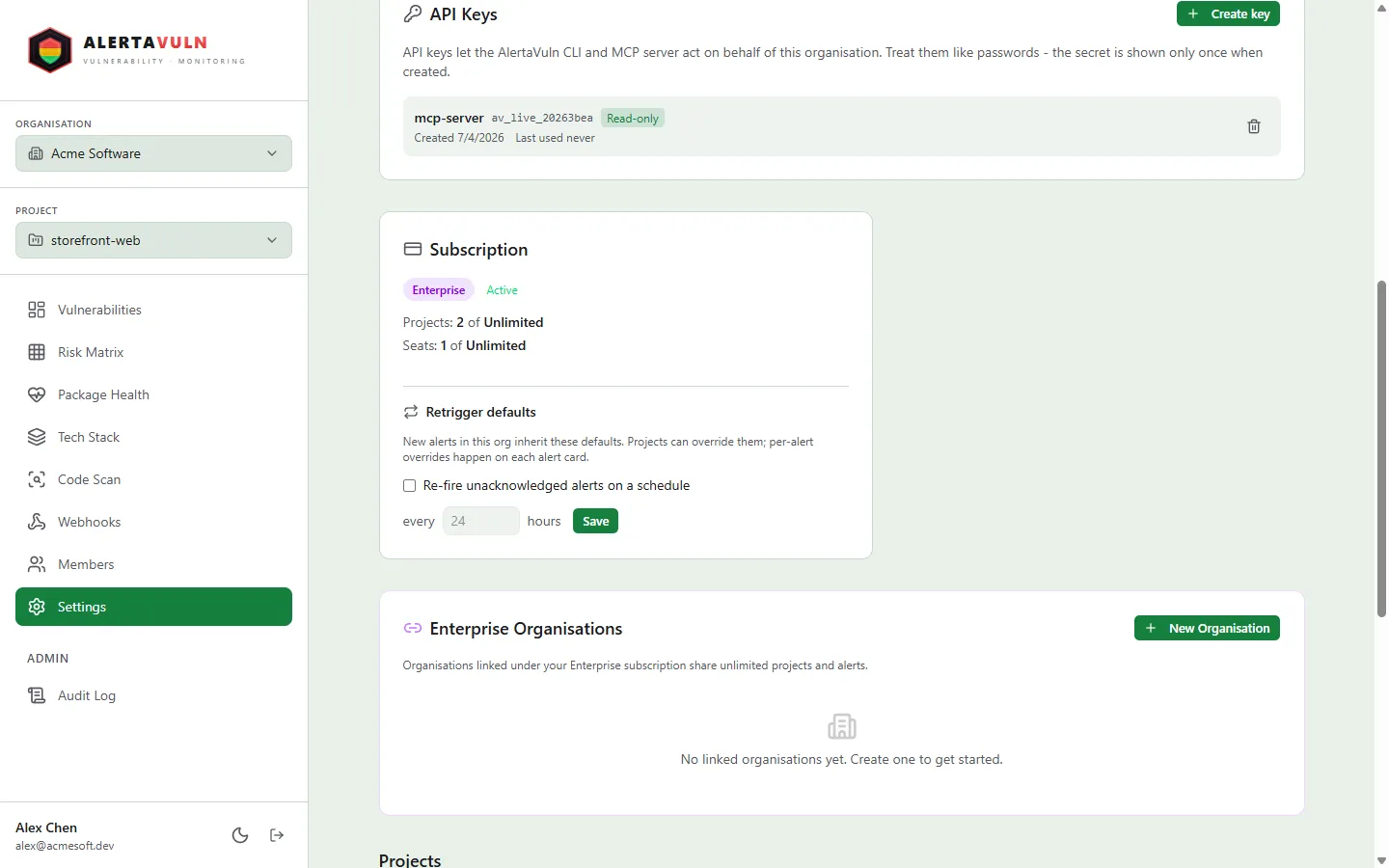
Create the key under Settings, in the API Keys panel - here named for the MCP server. Demo data.
Connect a client
Section titled “Connect a client”There are two ways to run the server, and they need different setup:
- Hosted endpoint (
https://alertavuln.com/mcp) - run by AlertaVuln. Nothing to install: point your client at the URL and present your API key. This is what the tabs below configure. - Local
mcp-routerbinary - runs on your own machine over stdio, for air-gapped setups or when you would rather not route your key through a bridge. You install it with the CLI; see Run the router locally below.
Replace av_live_YOUR_KEY_HERE with your key in each snippet.
Add the hosted server with one command:
claude mcp add --transport http alertavuln https://alertavuln.com/mcp \ --header "Authorization: Bearer av_live_YOUR_KEY_HERE"Or declare it in your project’s .mcp.json:
{ "mcpServers": { "alertavuln": { "type": "http", "url": "https://alertavuln.com/mcp", "headers": { "Authorization": "Bearer av_live_YOUR_KEY_HERE" } } }}Claude Desktop’s mcpServers config speaks stdio natively, so bridge to the
hosted HTTP endpoint with mcp-remote. Add this to
claude_desktop_config.json and restart Claude Desktop:
{ "mcpServers": { "alertavuln": { "command": "npx", "args": [ "-y", "mcp-remote", "https://alertavuln.com/mcp", "--header", "Authorization: Bearer av_live_YOUR_KEY_HERE" ] } }}If your Claude Desktop build supports remote MCP servers natively, point it
directly at https://alertavuln.com/mcp with the same Authorization header
instead.
Add the server to .cursor/mcp.json (project) or ~/.cursor/mcp.json
(global):
{ "mcpServers": { "alertavuln": { "url": "https://alertavuln.com/mcp", "headers": { "Authorization": "Bearer av_live_YOUR_KEY_HERE" } } }}Any client that supports the streamable HTTP transport can connect directly:
- Endpoint:
https://alertavuln.com/mcp - Header:
Authorization: Bearer av_live_...(orX-AlertaVuln-Key: av_live_...) - Protocol: MCP JSON-RPC 2.0 over stateless streamable HTTP
Run the router locally (stdio)
Section titled “Run the router locally (stdio)”For air-gapped setups, or when you prefer not to send your key through a bridge, the same binary runs as a local stdio MCP server. Supply the key via the environment instead of a header:
{ "mcpServers": { "alertavuln": { "command": "mcp-router", "env": { "ALERTAVULN_API_KEY": "av_live_YOUR_KEY_HERE", "ALERTAVULN_API_URL": "https://alertavuln.com" } } }}In stdio mode the key is read once at startup; ALERTAVULN_API_URL may be
omitted - it defaults to https://alertavuln.com.
Available tools
Section titled “Available tools”The server registers 41 tools. Tools marked write require a ReadWrite-scoped key; a read-only key calling them gets back “this API key is read-only or lacks permission”.
Organisation
Section titled “Organisation”| Tool | Access | Description |
|---|---|---|
get_org |
read | Get your organisation (id, name, contact email, timestamps) |
list_members |
read | List members of your organisation |
list_invites |
read | List pending / recently accepted invites |
get_audit_log |
read | One page of the org audit log |
Projects
Section titled “Projects”| Tool | Access | Description |
|---|---|---|
list_projects |
read | List all projects in your org |
get_project |
read | Get a single project by id |
create_project |
write | Create a new project |
update_project |
write | Update a project’s settings |
delete_project |
write | Delete a project and all its data |
Alerts
Section titled “Alerts”| Tool | Access | Description |
|---|---|---|
list_alerts |
read | List a project’s vulnerability alerts, triaged REDYELLOWGREEN; filter by status, acknowledged, resolved, page |
get_alert |
read | Get a single alert by id within a project |
acknowledge_alert |
write | Acknowledge an alert, with an optional note |
SAST (code scanning)
Section titled “SAST (code scanning)”| Tool | Access | Description |
|---|---|---|
list_sast_findings |
read | List a project’s current SAST findings, tiered RED / YELLOW / GREEN; filter by state (open / all / fixed), severity, and source repo |
list_sast_scan_jobs |
read | List a project’s server-side scan-job history (status, source repo, tier counts, queued time) |
DAST (running-app scanning)
Section titled “DAST (running-app scanning)”| Tool | Access | Description |
|---|---|---|
list_dast_findings |
read | List a project’s current DAST findings (a dynamic scan of a running web app or API - injection, XSS, misconfiguration, exposures), tiered RED / YELLOW / GREEN; filter by state (open / all / fixed), severity, and target URL |
list_dast_scan_jobs |
read | List a project’s DAST scan history: each run’s mode, target, RED / YELLOW / GREEN counts, and start time |
list_dast_targets |
read | List a project’s registered DAST scan targets (URL, name, environment, last-scanned) |
list_dast_server_scan_jobs |
read | List a project’s hosted DAST scan-job history: each job’s status, target URL, tier counts, and queued time |
Reachability
Section titled “Reachability”| Tool | Access | Description |
|---|---|---|
list_reachability_verdicts |
read | List a project’s reachability verdicts: per (CVE, package) whether the vulnerability is likely exploitable here, with an effective-priority score, the usage / exploit / exposure evidence behind it, and any human override; optionally filter to one CVE |
get_reachability_verdict |
read | Get a single reachability verdict by id within a project |
override_reachability_verdict |
write | Record a human override on a verdict (NotExploitable or Exploitable) with a required reason; overrides win over recomputation |
Overriding a verdict is more restricted than a normal write tool: it requires a Business or Enterprise subscription, and the override endpoint accepts member (Bearer JWT) sessions only, so an org API key cannot call it - through the MCP server it fails with a 401.
Container images
Section titled “Container images”| Tool | Access | Description |
|---|---|---|
list_container_images |
read | List a project’s scanned container images: each image’s ref, digest, OS, whether continuous monitoring is on, and its latest RED / YELLOW / GREEN counts |
list_container_findings |
read | List a project’s container image findings (vulnerable OS packages and dependencies baked into image layers), tiered RED / YELLOW / GREEN; filter by image, state (open / all), and severity. Each finding notes whether it comes from a base-image layer or one of your own |
get_base_image_advice |
read | Get base-image upgrade advice for one scanned image: alternative base images with the RED / YELLOW / GREEN count delta each would bring, plus the Dockerfile FROM line to change when the project has a connected repo |
Tech stack
Section titled “Tech stack”| Tool | Access | Description |
|---|---|---|
list_tech_stack |
read | List a project’s tracked packages with health flags |
add_tech_stack_item |
write | Add a package to a project’s tech stack |
update_tech_stack_item |
write | Update a tech-stack item in place |
remove_tech_stack_item |
write | Remove a package from the tech stack |
sync_tech_stack |
write | Reconcile a project’s tech stack from a parsed dependency manifest |
Webhooks
Section titled “Webhooks”| Tool | Access | Description |
|---|---|---|
list_webhooks |
read | List a project’s notification webhooks |
add_webhook |
write | Add a notification webhook (slack, googlechat, teams, discord, generic) |
update_webhook |
write | Update a webhook |
delete_webhook |
write | Delete a webhook |
test_webhook |
write | Send a test notification to a webhook |
Intelligence
Section titled “Intelligence”| Tool | Access | Description |
|---|---|---|
check_package |
read | Pre-flight a single package coordinate against AlertaVuln intelligence: matching CVEs (severity / CVSS / EPSS / KEV), maintenance health, suggested safe version |
find_exposed |
read | Find every project in your org with an alert for a given CVE id (blast-radius lookup) |
get_package_health |
read | List a project’s at-risk (deprecated / unmaintained) packages |
export_sbom |
read | Export a project’s SBOM (CycloneDX by default, optionally with VEX) - requires an Enterprise subscription |
Aggregate queries
Section titled “Aggregate queries”These read-only tools compose the lists above into bounded, decision-shaped answers - the questions an assistant is actually asked. Output is always a fixed top-N plus counts, never a full row dump, so the payload size is the same for a project with thousands of findings as for one with a handful.
| Tool | Access | Description |
|---|---|---|
get_findings_diff |
read | Summarise what changed over a window (default 7 days) per domain - dependencies, code, running-app, containers - as new / resolved / open counts plus up to five of the worst new findings |
get_top_risks |
read | Rank the most urgent findings across domains into one list: known-exploited (KEV) alerts first, then findings reachable in your code, then remaining critical items by exploit probability; de-escalated and triaged findings are reported as counts, not ranked |
get_posture_summary |
read | A project’s current posture: open counts by domain and severity, acknowledged / suppressed totals, the reachability-verdict distribution, and a one-line 7-day trend |
Verify the connection
Section titled “Verify the connection”The hosted server exposes an unauthenticated liveness endpoint:
curl -i https://alertavuln.com/mcp/health# expect: HTTP/1.1 200 OK ... okWith auth in place, an MCP initialize handshake identifies the server as
alertavuln (version 0.1.0), and tools/list enumerates the tools above.
If your key is missing, malformed, or revoked, tool calls fail with
“authentication failed” (HTTP 401 from the API).
See also
Section titled “See also”- CI/CD - gate pipelines with the CLI
av sast scan- the local scan whose findingslist_sast_findingssurfaces- Install the CLI - the installer that also delivers
mcp-router